8171 Check Online CNIC 2026 – How to Check Your BISP Record Through the 8171 Web Portal
8171 Check Online CNIC 2026
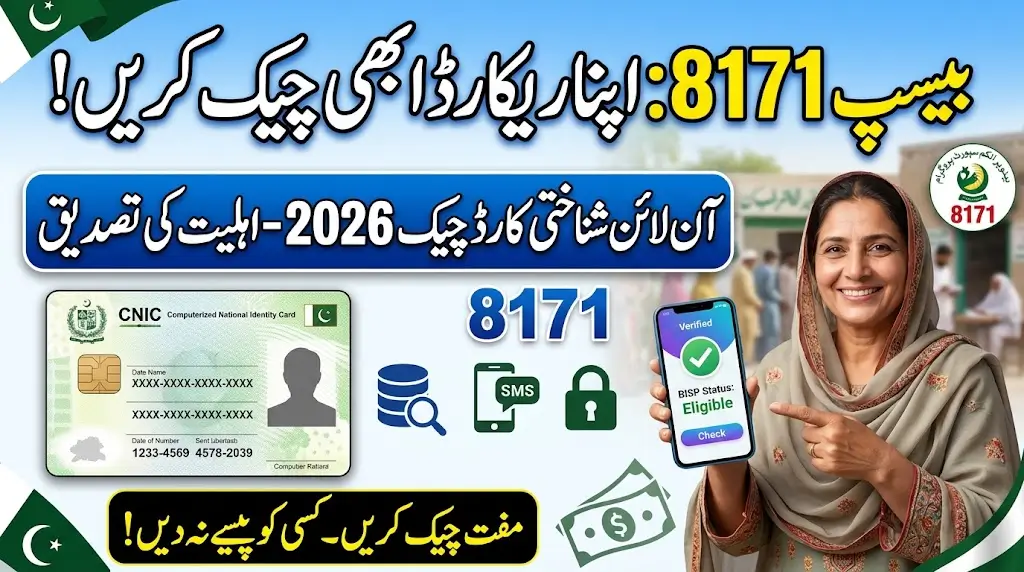
If you want to check your BISP record through CNIC in 2026, the 8171 Web Portal is the official online service provided by the Benazir Income Support Programme. It allows people to check their household eligibility status by entering their CNIC number and the verification code shown on the portal.
The process is simple and does not require you to pay anyone. Here you will know how to check your record, understand the result, check through SMS, and what to do if your record is not available.
What Is the 8171 Check Online CNIC System?
The 8171 Check Online CNIC also called 8171 Web Portal and it is a BISP service used to check a household’s eligibility or survey-related status. The official portal asks for the applicant’s CNIC number and a verification code before displaying the available result.
It is important to understand that checking your CNIC record is different from completing a new BISP registration or household survey. If your household has no record, you may need to visit a BISP registration facility for further processing.
How to Check BISP Record Through 8171 Web Portal
You can check your BISP record by following these simple steps.
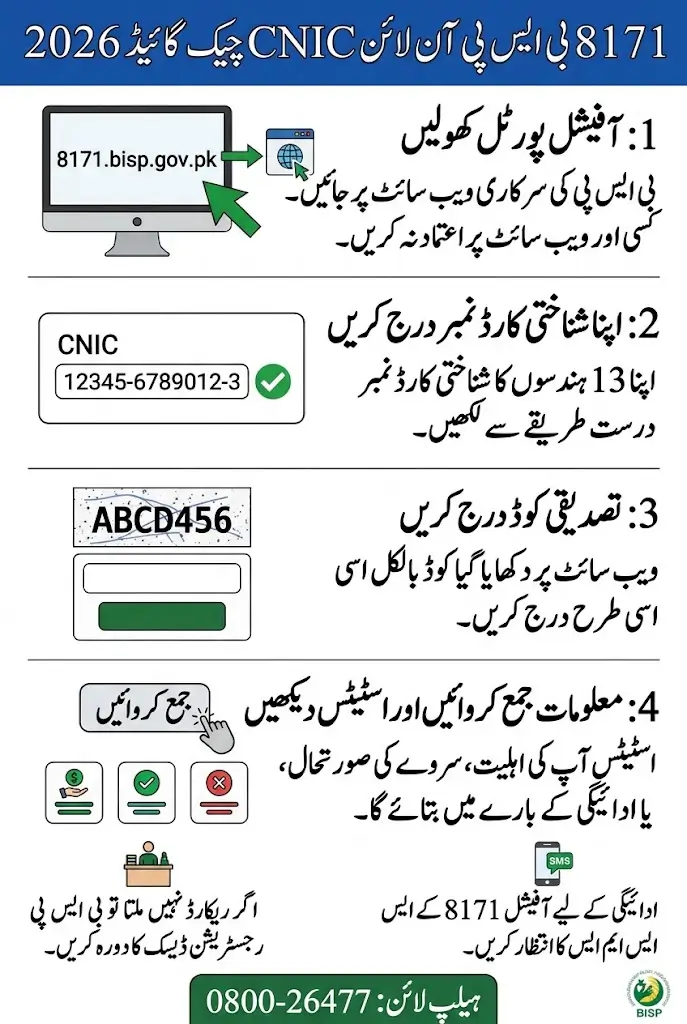
Step 1: Open the Official 8171 Web Portal
Open the official BISP 8171 Web Portal. Make sure you are using the official BISP website rather than a website that asks for money or unnecessary personal information.
Step 2: Enter Your CNIC Number
Enter your 13-digit CNIC number in the required field. Type the number carefully and make sure there are no mistakes.
Step 3: Enter the Verification Code
The portal displays a verification image or code. Enter the code exactly as shown.
Step 4: Submit the Information
After entering your CNIC and verification code, submit the information.
Step 5: Check Your BISP Record
The system will show the available information about your household’s eligibility or survey status. Read the result carefully before deciding what to do next.
The official portal currently provides the CNIC and verification-code fields for checking household eligibility.
Also Read: BISP Free SIM 2026 Final Deadline What Beneficiaries Need To Do
What Information Can You Check Through 8171?
The exact information displayed can depend on your household record and current BISP status. The 8171 service is primarily used to check eligibility and survey-related information.
You may see information showing whether your household is eligible, whether a record is available, or whether further action is required.
Remember that eligibility and payment availability are not always the same thing. Being eligible does not mean that you should visit a payment center without receiving the appropriate BISP notification.
What Does Your 8171 Result Mean?
Understanding the result is just as important as checking the CNIC. All the status shows in the portal and their meaning detail is given below
Eligible
If your household is shown as eligible, it means the available BISP record indicates that your household meets the relevant eligibility criteria.
For payment-related matters, follow the instructions provided through official BISP communication. BISP has advised beneficiaries to visit payment centers after receiving the official message from 8171.
Not Eligible
A “not eligible” result means the current BISP record does not show your household as eligible for the relevant assistance.
Do not pay an agent who promises to change your result. If you believe your information is incorrect or your household circumstances have changed, use the appropriate BISP office or registration process.
Record Not Found
If the system does not find your record, this does not automatically mean that you can never qualify.
BISP’s official guidance says that when there is no record on the 8171 portal, an adult household member may visit the nearest BISP registration desk or Tehsil Office for a household survey.
Under Verification or Further Action Required
If your information requires verification or another action, follow the instructions provided by BISP rather than relying on unofficial websites or agents.
How to Check BISP Status Through SMS 8171 ( Alternative Method)
People who cannot use the internet can also use the SMS method for checking their status.
Step 1: Open the SMS application on your mobile phone.
Step 2: Type your CNIC number.
Step 3: Send the CNIC information to 8171.
BISP’s published guidance has also identified sending the CNIC to 8171 by SMS as a method for checking survey and eligibility status.
Only trust official communication. BISP currently states that 8171 is its official number and warns beneficiaries not to trust messages from other numbers.
Also Read: Ehsaas Program Registration 8171 NADRA – Easy Guide (2026)
Can You Register for BISP Through the 8171 Web Portal?
This is an important point because many people confuse CNIC checking with BISP registration.
The 8171 portal is used to check available household information and eligibility status. If your household has not been surveyed or your record needs updating, you may need to visit a BISP registration or Dynamic Registry facility.
BISP has established registration facilities at the Tehsil level for households that have not been surveyed and for updating certain household information.
So, if your 8171 result says that no record is available, do not assume that repeatedly checking the portal will complete your registration.
What to Do If 8171 Shows No Record
If your CNIC does not produce a record, first make sure you entered the CNIC correctly.
If the problem continues, visit the relevant BISP Tehsil Office or registration facility and ask about the household survey.
BISP’s official registration guidance explains that registration desks can handle new surveys for households that have not previously been surveyed and can also process updates for surveyed households.
How to Update Your BISP Survey or Household Information
Household circumstances can change. For example, information about family members, marital status, children, income, or other household details may need updating.
BISP has moved toward a dynamic registry with registration centers at the Tehsil level. These centers are intended to help households that were missed from the survey and households that need information updated.
BISP has also advised families receiving assistance for three years to complete a re-survey to determine continued eligibility.
What to Do If You Are Eligible but Payment Is Not Showing
Do not assume that an eligibility result automatically means cash is ready for collection.
BISP advises beneficiaries to wait for the official payment message from 8171 before visiting a payment center.
If you have received an official payment message but face a problem with payment, contact BISP through its official complaint channels or visit the relevant BISP office.
If someone makes an unauthorized deduction from your payment, BISP says beneficiaries should report the matter through the official helpline 0800-26477 or the nearest BISP office.
Also Read: CM Punjab Parwaz Card 2026: Features, Benefits And Loan Details
Is BISP Registration or Survey Free?
Yes. BISP registration and survey are free.
BISP officials have repeatedly warned the public that no fee should be charged for the survey or registration process. If someone asks you for money in exchange for registration, a survey, or a BISP status check, be careful because it may be fraud.
You do not need to pay an agent just to check your CNIC through the 8171 service.
What Documents May Be Needed at a BISP Office For Resolving Any Problem?
If you are visiting a BISP registration facility, take your original identity documents and relevant family information with you. Depending on your case, useful documents may include:
- Original CNIC
- CNICs of household members where required
- Children’s B-Forms
- An active mobile number
- Relevant household information
- Any BISP communication or letter you have received
BISP’s registration guidance specifically refers to CNICs of household members and children’s B-Forms during the registration process.
The exact documents required can depend on the reason for your visit.
How to Avoid Fake 8171 Websites and Messages
Many people search for 8171 online, which can make it difficult to distinguish the official service from unofficial websites.
Follow these basic safety rules:
Use the Official 8171 Service
Use the official BISP 8171 portal for checking your household record. The official portal is hosted on the 8171.bisp.gov.pk domain.
Do Not Pay for a CNIC Check
A person who asks for money simply to check your BISP status is not providing a required BISP service.
Trust Messages From 8171
BISP has clearly stated that 8171 is the official BISP number and that messages from other numbers should be treated as fraudulent.
Do Not Share Sensitive Information
Do not give strangers your passwords, banking PINs, OTPs, or other sensitive information just because they claim to be BISP representatives.
BISP has previously taken action against fraudulent websites and SIMs used in scams, showing why beneficiaries should use official channels.
Also Read: Parwaz Card Official Portal Login 2026 Step-by-Step Guide
Common Problems During 8171 CNIC Check
CNIC Is Not Recognized
Check that all 13 digits have been entered correctly. If the problem continues, your household record may need further verification.
Record Is Not Found
A missing record may mean that your household has not been surveyed or that the available information does not match the current database. Visit the appropriate BISP registration facility for guidance.
Verification Code Is Not Working
Refresh the portal and enter the newly displayed code carefully. Avoid entering an old code after refreshing the page.
Website Is Not Opening
The website may temporarily experience technical or traffic-related issues. Try again later and make sure you are using the official BISP portal.
Information Does Not Match
If your personal or household information has changed, ask BISP about updating your survey information instead of repeatedly submitting incorrect information online.
How to Contact BISP for a Complaint
If you face a genuine problem involving your BISP payment, eligibility, registration, or an unauthorized deduction, use official BISP complaint channels.
BISP’s official helpline for complaints is 0800-26477. The programme has also advised beneficiaries to report payment deductions and other problems through the relevant BISP office.
Do not give money to an agent who claims that a complaint can only be resolved after payment.
Important Things to Remember Before Checking Your CNIC
Before using the 8171 service, remember these points:
- Keep your 13-digit CNIC number ready.
- Enter your CNIC information carefully.
- Use the official 8171 BISP portal.
- Do not pay anyone for a simple CNIC status check.
- Trust official BISP messages from 8171.
- If there is no record, ask BISP about the household survey.
- Do not visit a payment center simply because you checked your eligibility.
- Wait for the official payment message when payment collection is involved.
- Report unauthorized deductions or fraud to BISP.
FAQs 8171 CNIC Check 2026
How can I check my BISP record online by CNIC?
Open the official 8171 BISP Web Portal, enter your 13-digit CNIC number, enter the verification code, and submit the information. The portal will show the available household eligibility or survey-related result.
How do I check my 8171 status?
You can check your available status through the official 8171 Web Portal using your CNIC. BISP has also provided SMS-based checking through 8171.
Can I check BISP eligibility through 8171?
Yes. The official 8171 portal is designed to allow users to check household eligibility information using their CNIC and verification code.
Can I check 8171 status without internet?
Yes. BISP’s published guidance identifies SMS as another way to check survey and eligibility status. Send your CNIC information to 8171.
What does “record not found” mean on 8171?
It generally means the system does not currently have a matching record for the CNIC or household information you provided. If you believe you should be included, contact or visit the relevant BISP registration facility for guidance.
Can I register for BISP through the 8171 portal?
The 8171 portal is primarily used to check available eligibility and survey information. New or updated household surveys are handled through BISP registration facilities and Dynamic Registry Centers.
What should I do if I am eligible but my payment is not showing?
Wait for official payment communication from 8171 and follow the instructions provided by BISP. If you have a payment problem or face an unauthorized deduction, contact BISP through its official complaint channels.
Is the 8171 CNIC check free?
Yes. You should not pay an agent for checking your BISP status. BISP also states that its registration and survey services are free of charge.
How can I identify a fake 8171 message?
BISP states that 8171 is its official number for messages. Messages claiming to be from BISP but coming from other numbers should be treated as suspicious or fraudulent.
Final Words
The 8171 Check Online CNIC 2026 process is straightforward when you use the official BISP 8171 Web Portal. Enter your CNIC, complete the verification step, and check the result shown for your household.
If your record is missing, your information needs updating, or you have a payment problem, do not rely on agents or unofficial websites. Use the official BISP registration facilities and complaint channels. Most importantly, remember that BISP does not charge a survey or registration fee, and 8171 is the official BISP number for beneficiary messages.